
Buying an e-reader sounds simple until you start comparing models, storage options, screen sizes, lighting features, battery life, and waterproofing. Then comes the question that often causes the most confusion: How much storage do you actually need?
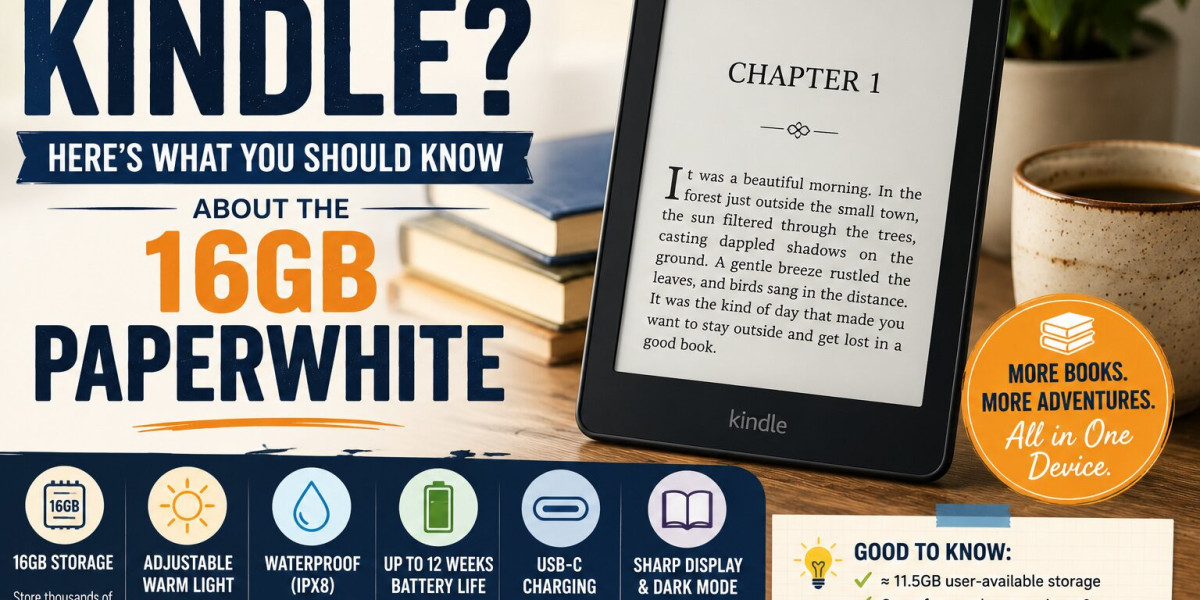
The amazon kindle paperwhite 16gb is an interesting option for readers who want more room for books without stepping into the higher-storage Signature Edition. The current Kindle Paperwhite 12th Generation, released in 2024, comes with 16GB of internal storage, of which approximately 11.5GB is available to the user. Amazon lists features including a touchscreen, adjustable warm light, USB-C charging, dark mode, VoiceView support over Bluetooth, IPX8 waterproofing, and up to 12 weeks of battery life.
But specifications only tell part of the story.
Before buying any e-reader, it helps to understand what those numbers actually mean in everyday use. Will 16GB be enough for your reading habits? Is the Paperwhite better suited to you than a basic Kindle? What makes it different from the 32GB Signature Edition? And are there situations where paying for more storage makes sense?
Let's break it down in simple terms.
What Is the Kindle Paperwhite 16GB?
The Kindle Paperwhite is Amazon's mid-range dedicated e-reader, positioned between the standard Kindle and higher-end models.
The 12th-generation Paperwhite was released in 2024. Amazon's device information lists the standard Paperwhite with 16GB of internal storage and approximately 11.5GB available to the user. It also includes an adjustable warm light, USB-C charging, dark mode, waterproofing rated IPX8, and a touchscreen.
That combination makes it appealing to readers who want a dedicated reading device with features beyond the basics.
The important thing to understand, however, is that 16GB doesn't mean you get 16GB of usable space.
Some storage is occupied by the device's software and system requirements. That's why Amazon lists approximately 11.5GB as available to the user.
For most people, that's still a substantial amount of room for an e-reader.
Is 16GB Enough for Reading Books?
For the average person who mainly reads novels, biographies, business books, or other text-heavy books, 16GB is more than enough for a large personal library.
Most ordinary eBooks don't consume anything close to the amount of space that modern movies, games, or smartphone apps can use.
This means you shouldn't automatically assume that the 32GB model is necessary simply because it has twice the storage.
If your Kindle library consists mostly of standard text-based books, the 16GB Paperwhite can hold a very large collection.
Even readers who download books regularly may have trouble filling the available storage quickly.
The situation changes somewhat if you regularly download comics, manga, graphic novels, large PDFs, or other content containing many high-resolution images.
Those files can take considerably more space than ordinary text-based books.
So the better question isn't simply:
"Is 16GB enough?"
It's:
"What kind of content do I plan to store?"
What Does the 16GB Storage Actually Give You?
Storage determines how much content you can keep downloaded on the device at one time.
The current Paperwhite provides approximately 11.5GB of user-available storage from its 16GB internal capacity.
For a typical reader, that is plenty of space.
Think about your normal reading habits.
Do you usually finish one book before starting another?
Do you keep a few books downloaded for vacations?
Do you download dozens of books because you enjoy having options?
If you answered yes to any of these questions, you probably don't need enormous storage.
A person who reads primarily novels is unlikely to notice much difference between 16GB and 32GB during everyday use.
16GB vs. 32GB: What's the Difference?
The storage difference becomes more important when comparing the standard Paperwhite with the Paperwhite Signature Edition.
Amazon lists the 12th-generation Paperwhite Signature Edition with 32GB of internal storage and approximately 25GB available to the user. It also adds features such as wireless charging and an auto-adjusting front light.
That means you're not simply paying for extra storage.
The Signature Edition combines additional storage with other hardware features.
For a reader who primarily wants a straightforward e-reading experience, the standard 16GB model may make more sense.
For someone who wants the additional conveniences and expects to store lots of larger files, the Signature Edition may be more attractive.
The right choice depends on your priorities rather than the bigger number alone.
The Screen Is One of the Biggest Reasons to Consider the Paperwhite
Storage gets a lot of attention, but the reading experience itself matters much more.
After all, you'll spend your time looking at the screen rather than thinking about how much storage remains.
The Paperwhite is designed specifically for reading rather than functioning like a conventional tablet.
That distinction is important.
A tablet gives you access to apps, video, social media, games, websites, and countless distractions.
A dedicated Kindle is much more focused.
You open it, find your book, and read.
For people who struggle to concentrate when reading on their phone, this focused environment can be a meaningful advantage.
Warm Light Can Make Evening Reading More Comfortable
The 12th-generation Kindle Paperwhite includes an adjustable warm light.
This allows you to adjust the screen's lighting toward a warmer appearance, which many readers may prefer during evening reading.
The feature is particularly useful if you like reading in bed or in rooms with low ambient lighting.
Instead of relying on an external lamp every time you want to read, you can adjust the device's built-in lighting to suit your environment.
Of course, personal preference varies.
Some readers prefer a cooler, brighter display during the day and a warmer appearance at night.
The ability to adjust the light gives you more flexibility.
Dark Mode Is Another Useful Option
The current Paperwhite also supports dark mode.
Dark mode reverses the typical display appearance, making the background dark and the text light.
Some readers enjoy this setting during nighttime reading because it feels different from a traditional bright page.
Again, this comes down to personal preference.
You don't have to use dark mode simply because the device offers it.
The benefit is having another reading option available when you want it.
Waterproofing Makes the Paperwhite More Flexible
One of the features that separates the Paperwhite from some basic e-readers is its IPX8 waterproof rating. Amazon lists the 12th-generation Paperwhite as waterproof.
This can be useful for people who like reading near water.
Imagine reading beside a pool, relaxing at the beach, or sitting in a bathtub with a book.
Accidental water exposure is less concerning when the device is designed with water resistance in mind.
However, waterproof does not mean indestructible.
Amazon's safety guidance explains that water protection is intended for brief accidental immersion under certain conditions and that the device isn't intended for underwater use. Amazon also advises against intentionally exposing the device to seawater, salt water, chlorinated water, or other liquids.
So think of waterproofing as extra protection—not an invitation to take your Kindle swimming.
Battery Life Is Designed for Long Reading Sessions
Another reason dedicated e-readers appeal to frequent readers is battery life.
Amazon lists up to 12 weeks of battery life for the 12th-generation Paperwhite.
The phrase "up to" matters.
Real-world battery life depends on factors such as lighting settings, wireless connectivity, usage patterns, and other conditions.
Still, the general idea is straightforward: you shouldn't need to charge the device every night like you might with a heavily used smartphone.
For travelers, commuters, and people who read frequently, fewer charging interruptions can be convenient.
USB-C Makes Charging Familiar
The current Paperwhite uses USB-C for charging.
That's useful because USB-C has become common across phones, tablets, laptops, headphones, and other electronics.
Amazon's setup documentation notes that the Kindle includes a USB cable, while a separate power adapter may be required if you want to charge from a wall outlet.
If you already have compatible charging equipment at home, this can make the device easier to integrate into your existing setup.
What About Reading on a Phone?
This is one of the biggest questions potential Kindle buyers should ask themselves.
You can already read Kindle books through Amazon's apps on phones and other devices. Amazon's Kindle service allows readers to access their books across supported devices and customize options such as text size, font, layout, margins, and background color.
So why buy a dedicated e-reader?
The answer isn't necessarily that a Kindle can do something your phone can't.
It's that the experience is different.
A phone is designed to do almost everything.
A Kindle is designed primarily for reading.
That difference can help you create a more focused reading habit.
A Kindle Can Reduce Digital Distractions
Think about what happens when you pick up your phone to read.
You might open your book.
Then a notification appears.
You check a message.
You glance at social media.
You look something up.
Twenty minutes later, you realize you haven't read much at all.
A dedicated e-reader removes many of those distractions.
There's no endless stream of social media feeds competing for your attention.
For readers who want to spend more time with books and less time scrolling, that simplicity can be one of the strongest reasons to consider a Kindle.
The 16GB Paperwhite Isn't a Tablet
This is another important expectation to set before buying.
A Kindle is not meant to replace your iPad, Android tablet, or laptop.
It isn't designed around watching videos, playing demanding games, or running a large selection of general-purpose apps.
Its strength comes from doing fewer things well.
If you want an entertainment tablet, look elsewhere.
If you want a device dedicated to reading, the Paperwhite makes much more sense.
Understanding that difference can prevent disappointment after purchase.
What Can You Read on It?
Kindle devices support a wide range of digital reading content through Amazon's ecosystem.
That includes novels, nonfiction, magazines, comics, and other digital publications.
Amazon also provides reading features such as adjustable text size, font, layout, margins, highlighting, notes, dictionary lookups, and search within books.
This flexibility can make the reading experience much more personal.
Someone with weaker eyesight, for example, can increase text size.
Another reader may prefer a different font or margin setting.
You don't have to accept the appearance of a printed book exactly as it is.
You can adjust the digital reading experience to your preferences.
What About PDFs?
This is where you should think carefully about your intended use.
A Kindle can handle certain PDF content, but PDFs can behave differently from ordinary reflowable eBooks.
A conventional eBook can adjust its text and layout to fit the screen.
A fixed-format document may not behave the same way.
Amazon notes that reflowable Kindle books support adjustable text size and formatting, while fixed-layout content has different capabilities.
If you frequently read technical PDFs, academic documents, large manuals, or heavily formatted files, consider how important that use case is before buying.
For ordinary novels and text-based books, this usually isn't a major concern.
Is the 16GB Paperwhite Good for Comics and Manga?
It can be, but storage requirements become more relevant.
Comics and manga often contain many images, which can make individual files considerably larger than ordinary novels.
If you're building a large digital graphic-novel collection and want to keep everything downloaded simultaneously, 32GB gives you more breathing room.
That's one of the situations where the larger-capacity Signature Edition can make more sense.
If you only read the occasional graphic novel, however, 16GB may still be perfectly reasonable.
Think About Your Reading Habits Before Buying
Instead of copying someone else's recommendation, look at your own habits.
Ask yourself:
How often do I read?
If you read every day, investing in a dedicated e-reader may provide more value.
What do I read?
Mostly novels? 16GB is likely plenty.
Mostly comics, manga, or image-heavy documents? More storage may be useful.
Where do I read?
If you read near water, waterproofing becomes more valuable.
When do I read?
If you often read at night, adjustable warm lighting may be particularly useful.
Do I get distracted by my phone?
If the answer is yes, a dedicated reading device could help create a more focused environment.
Who Should Consider the 16GB Paperwhite?
The standard Paperwhite can make sense for several types of readers.
Everyday Novel Readers
If most of your library consists of standard eBooks, 16GB provides plenty of room.
Frequent Travelers
The compact format and long battery life can make it convenient for travel.
Bedtime Readers
Warm lighting and dark mode give you additional ways to customize nighttime reading.
Beach or Pool Readers
Water resistance provides an extra layer of protection around water, although it doesn't make the device suitable for intentional underwater use.
Readers Who Want Fewer Distractions
A dedicated reading device can provide a simpler environment than a smartphone.
Who Might Want More Storage?
The 32GB Signature Edition deserves consideration if you regularly work with larger files.
You may benefit from more storage if you:
- Keep large collections of comics
- Download lots of manga
- Store numerous image-heavy books
- Keep many PDFs on the device
- Prefer having your entire digital library downloaded
- Want the Signature Edition's additional features
Amazon lists the Signature Edition with 32GB storage, approximately 25GB available to the user, wireless charging, and an auto-adjusting front light.
For a conventional reader, however, paying more simply to have a larger storage number may not provide a meaningful everyday benefit.
Don't Forget About Your Amazon Account
A Kindle works as part of Amazon's broader reading ecosystem.
Amazon's setup instructions explain that you'll need an Amazon account during setup. The company also supports syncing your Kindle content and reading progress across supported devices.
That means your Kindle isn't an isolated device.
Your books and reading experience can connect with the wider Kindle ecosystem.
If you already use Kindle books, this can make the transition particularly straightforward.
Is the Kindle Paperwhite Comfortable for Long Reading?
Comfort is subjective, but dedicated e-readers have one obvious advantage: they are built around reading.
The Paperwhite lets you adjust text size, fonts, margins, and other reading settings. Amazon says Kindle supports these customization options across its reading experience.
That means you're not locked into one fixed presentation.
If the text feels too small, enlarge it.
If the spacing doesn't feel right, adjust the layout.
If you prefer a different font, choose one that feels comfortable.
Small adjustments can make a surprisingly large difference during long reading sessions.
Accessibility Features Are Worth Knowing About
Accessibility is another area worth considering before purchasing.
Amazon lists VoiceView support over Bluetooth on the 12th-generation Paperwhite.
Amazon also provides accessibility guidance covering features such as screen-reader support and text customization.
These features won't matter equally to every reader, but knowing they're available can help people choose a device that better fits their needs.
Common Mistakes People Make Before Buying
Choosing Based Only on Storage
More storage sounds better, but most text-based readers don't need enormous capacity.
Ignoring the Reading Environment
If you regularly read at night or near water, lighting and waterproofing may matter more than storage.
Expecting a Tablet
A Kindle isn't designed to replace a tablet.
Assuming Waterproof Means Waterproof in Every Situation
Water resistance has limits. Follow Amazon's care instructions and avoid intentional exposure to seawater, chlorinated water, or other liquids.
Forgetting That Available Storage Is Lower Than Advertised Capacity
A 16GB device doesn't provide the full 16GB for personal content. Amazon lists approximately 11.5GB available on the 12th-generation Paperwhite.
Frequently Asked Questions
Is 16GB enough on a Kindle Paperwhite?
For most readers who primarily download text-based books, 16GB should provide substantial storage. The 12th-generation Paperwhite has approximately 11.5GB available to the user after system storage.
How much storage does the Kindle Paperwhite 12th Generation have?
The standard 12th-generation Paperwhite has 16GB of internal storage, with approximately 11.5GB available for user content.
Is the 16GB Paperwhite waterproof?
Amazon lists the 12th-generation Kindle Paperwhite as IPX8 waterproof. However, Amazon's safety guidance says it isn't intended for underwater use and recommends avoiding intentional exposure to seawater, salt water, chlorinated water, and other liquids.
Does the Kindle Paperwhite have warm light?
Yes. Amazon lists an adjustable warm light on the 12th-generation Kindle Paperwhite.
Does the Kindle Paperwhite use USB-C?
Yes. The current Paperwhite uses a USB-C charging port.
Is 32GB better than 16GB for Kindle?
Not necessarily. If you mostly read ordinary novels, 16GB may already be more than enough. The 32GB Signature Edition becomes more interesting if you store lots of larger files or want its additional features.
Can I read Kindle books on my phone instead?
Yes. Amazon provides Kindle reading options across supported devices and applications. However, a dedicated Kindle offers a more focused reading experience without the many distractions found on a smartphone.
Is the Paperwhite good for nighttime reading?
It can be. The current model includes adjustable warm lighting and dark mode, allowing you to customize the display for different reading environments.
Does the Kindle Paperwhite have a long battery life?
Amazon rates the 12th-generation Paperwhite for up to 12 weeks of battery life. Actual battery life varies according to usage and settings.
Final Thoughts
Before buying a Kindle, don't let the storage number make the decision for you.
The amazon kindle paperwhite 16gb offers a combination of features that can make sense for everyday readers: approximately 11.5GB of user-available storage, adjustable warm lighting, dark mode, USB-C charging, IPX8 waterproofing, and Amazon's stated battery life of up to 12 weeks.
For someone who mainly reads novels and other text-heavy books, 16GB is likely to feel generous.
The bigger question is what kind of reader you are.
If you want a simple device dedicated to books, appreciate adjustable lighting, often read near water, and want enough storage for a substantial library, the standard Paperwhite deserves serious consideration.
If you regularly download large collections of comics, manga, or image-heavy documents—or simply want the additional features of the Signature Edition—the 32GB option may be worth considering.
In the end, the best Kindle isn't necessarily the one with the most storage or the longest list of features.
It's the one that matches the way you actually read.
And for many everyday book lovers, the 16GB Paperwhite offers a comfortable middle ground: plenty of room for books, useful reading features, and a dedicated experience that keeps the focus where it belongs—on the next chapter.




